
Guide · 7 min read
What is AI Automation?
AI automation combines intelligent data understanding with workflow automation to get work done faster, more accurately and with better control.
That is what separates it from plain rule-based automation and RPA, which follow fixed steps and cannot interpret unstructured input like an emailed invoice or make a judgment call when something does not match. AI automation reads the input, applies your rules, updates your systems, and brings a person in only when the decision genuinely needs one.
The framework
The 6 steps, explained.
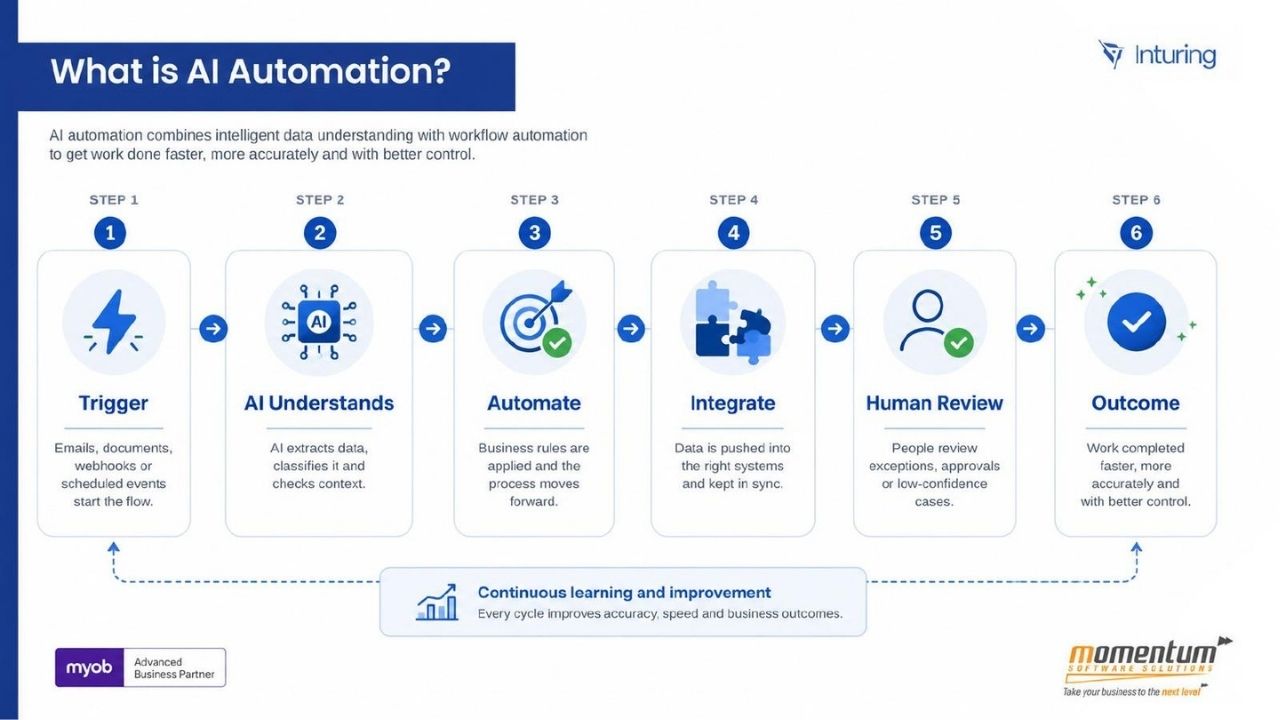
Every AI automation we build follows the same path, from something happening to the right outcome. The detail changes per process, the shape does not.
Step 01
Trigger
Something happens that starts the flow: an email arrives, a document is uploaded, a webhook fires, or a scheduled check finds new or changed records. It can also be a person pressing a button or submitting a form.
Step 02
AI understands
The AI makes sense of the input. It extracts structured data from unstructured content, classifies what kind of document or request it is, checks the data against what is already known, and scores its own confidence.
Step 03
Automate
Your business rules are applied. Values are validated, records are matched (for example a three-way match between order, receipt and invoice), and the flow decides the next step: approve, hold or escalate.
Step 04
Integrate
The validated result is written straight into the system of record through its API, and connected systems are updated in the same run. One outcome, kept in sync everywhere, with no re-keying.
Step 05
Human review
Only exceptions, approvals and low-confidence cases go to a person, and they arrive with context: what the system found and why it stopped. The reviewer makes one decision rather than reworking a whole process.
Step 06
Outcome
Work that took hours or days completes in minutes, with fewer errors because nothing is re-typed. Every step is logged, so you get a full audit trail rather than a black box.
The cycle also feeds back on itself. Every exception a person resolves tells you where the rules or the confidence thresholds need adjusting, so accuracy and speed improve run after run.
In practice
How it looks without vs with automation.
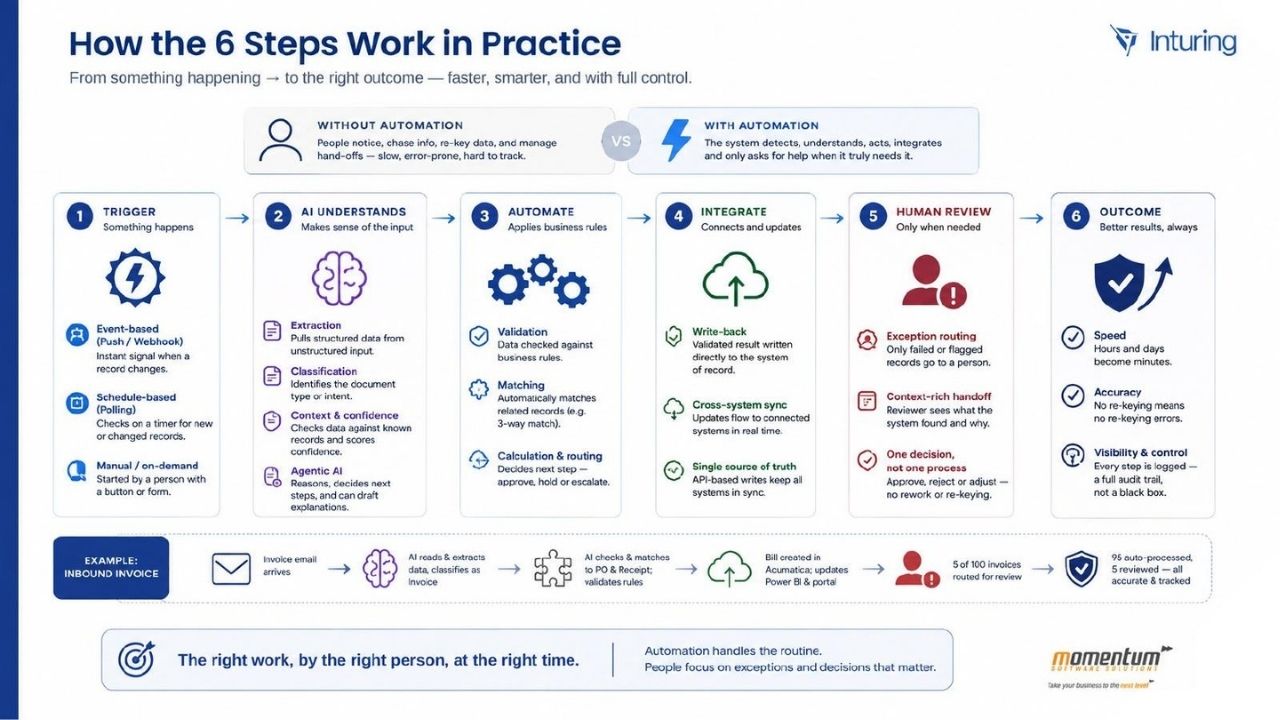
Without automation, people notice the work, chase the information, re-key the data and manage the hand-offs. With automation, the system detects, understands, acts and integrates, and only asks for help when it truly needs it.
Worked example: an inbound invoice
Accounts payable is the clearest illustration because the input is unstructured, the rules are well understood, and the cost of re-keying is easy to measure.
- 01An invoice arrives by email into a monitored mailbox. Nobody has to notice it or file it.
- 02The AI reads the attachment, extracts the supplier, dates, line items and totals, and classifies it as an invoice.
- 03The flow matches it against the purchase order and goods receipt, then validates it against your approval and tolerance rules.
- 04The bill is created in the finance system, and reporting and the supplier portal are updated from the same result.
- 05Out of 100 invoices, 5 are routed to a person because something did not match or confidence was low.
- 0695 are processed automatically and 5 are reviewed. All 100 are accurate, tracked and visible.
The right work, by the right person, at the right time. Automation handles the routine. People focus on the exceptions and decisions that matter.
FAQ
Questions we get asked first.
The five things operations and finance leaders usually want settled before going further.
- What is AI automation?
- AI automation is the combination of intelligent data understanding and workflow automation. AI interprets the messy input a process starts with, such as an email, PDF or free-text request, and an automated workflow then applies your business rules, updates the right systems and involves a person only when it needs to. The result is work completed faster, more accurately and with better control.
- How is AI automation different from traditional automation or RPA?
- Traditional automation and RPA follow fixed rules and fixed screens. They are effective when every input is structured and identical, and they break when a document layout changes or a request is written in plain English. AI automation adds an interpretation layer: it can read unstructured content, classify it, match it against existing records and score its own confidence, so the workflow can make a judgment call or hand off to a person instead of failing.
- Do we need to replace our existing systems to use AI automation?
- No. AI automation sits across the systems you already run, such as your ERP, CRM, finance platform and document stores, and connects to them through their APIs. In most of our engagements the value comes from removing the manual handling between systems, not from swapping any of them out.
- What does human in the loop mean in this context?
- It means people stay responsible for the decisions that matter while the routine work runs automatically. Exceptions, approvals and low-confidence results are routed to a named reviewer with the context of what the system found and why it stopped. Everything the reviewer decides is logged, so the process remains auditable.
- How long does an AI automation project usually take to show results?
- We scope to a single process first, and a well-defined process typically moves from discovery to a working solution in production within a few weeks rather than months. Proving value on one process is what earns the case for a broader roadmap.
Next steps
Work out where AI automation would pay off first.
If you want a view of your own readiness before talking to anyone, the maturity assessment scores your processes, systems, data and governance in about six minutes and returns a 90-day roadmap.
Related reading
Prefer to talk it through? A 30-minute call is usually enough.
Bring us the process that is slowing you down.
A 30-minute discovery call is enough to work out whether automation is the right answer, and what it would take.